Getting Started
Installation
Requires Python ≥ 3.12. ParsBench 0.2+ targets current library versions (transformers 5, datasets 5, numpy 2), which need Python 3.12+. If you're on Python 3.10/3.11, pin the previous release:
pip install "parsbench==0.1.7".
Install ParsBench using pip:
pip install parsbench
Two optional extras, depending on what you're doing:
pip install 'parsbench[test]'also installs pytest, so you can run golden suites withparsbench testin CI.- The Persian Math benchmark task
additionally needs the Math Equivalence package, installed manually:
pip install git+https://github.com/hendrycks/math.git
Pick your path
ParsBench does two different jobs. Pick the one you came for:
- "I'm building a Persian chatbot/agent and want to test it" → evaluate your app below, then the App Evaluation docs.
- "I have a model and want to know how good it is at Persian" → benchmark a model below, then the Benchmarking tutorial.
Evaluate your app (60 seconds, no API key)
Your app is any function that takes a user message and returns a string, a
Trace, or an OpenAI-format message list. Write down what a good answer looks
like as Golden objects, and evaluate:
from parsbench.appeval import AppEvaluator, Golden, ToolCall
def my_bot(message): # stand-in for your app
return [
{"role": "assistant", "tool_calls": [
{"id": "1", "function": {"name": "search_flights",
"arguments": '{"date": "1405-07-05"}'}}]},
{"role": "tool", "tool_call_id": "1", "content": "پرواز PY-101"},
{"role": "assistant", "content": "پرواز ساعت ۸ صبح، قیمت ۲٬۵۰۰٬۰۰۰ ریال"},
]
evaluator = AppEvaluator(goldens=[
Golden(
input="بلیط تهران-مشهد برای ۵ مهر ۱۴۰۵ میخوام. قیمتش چنده؟",
tools=[ToolCall("search_flights", date="2026-09-27")], # Jalali == Gregorian
contains=["250 هزار تومان"], # rials == tomans
forbidden_tools=["book_flight"],
),
])
result = evaluator.evaluate(my_bot)
print(result)
Every filled Golden field switches on its check. There is no separate
metric configuration and no YAML. The deterministic checks (tools, contains,
format, budgets) run with no API key at all; add a
judge model when you want LLM-judged correctness,
faithfulness, and refusal checks too.
Then open the local viewer to browse the run, traces included:
parsbench view
Continue with the App Evaluation overview.
Benchmark a model
Evaluating a pre-trained model
Load a model and tokenizer from HuggingFace, then evaluate on a task, here Persian Math:
from transformers import AutoModelForCausalLM, AutoTokenizer

from parsbench.models import PreTrainedTransformerModel
from parsbench.tasks import PersianMath

model = AutoModelForCausalLM.from_pretrained(
    "Qwen/Qwen2-72B-Instruct",
    torch_dtype="auto",
    device_map="auto"
)
tokenizer = AutoTokenizer.from_pretrained("Qwen/Qwen2-72B-Instruct")

tf_model = PreTrainedTransformerModel(model=model, tokenizer=tokenizer)

with PersianMath() as task:
    results = task.evaluate(tf_model)
Benchmarking multiple models on multiple tasks
Any OpenAI-compatible API works, so local models via Ollama are one line each:
ollama run qwen2
ollama run aya
Then benchmark them:
from parsbench.benchmarks import CustomBenchmark
from parsbench.models import OpenAIModel
from parsbench.tasks import ParsiNLUMultipleChoice, PersianMath, ParsiNLUReadingComprehension

qwen2_model = OpenAIModel(
    api_base_url="http://localhost:11434/v1/",
    api_secret_key="ollama",
    model="qwen2:latest",
)
aya_model = OpenAIModel(
    api_base_url="http://localhost:11434/v1/",
    api_secret_key="ollama",
    model="aya:latest",
)

benchmark = CustomBenchmark(
    models=[qwen2_model, aya_model],
    tasks=[
        ParsiNLUMultipleChoice,
        ParsiNLUReadingComprehension,
        PersianMath,
    ],
)
result = benchmark.run(
    prompt_lang="fa",
    prompt_shots=[0, 3],
    n_first=100,
    sort_by_score=True,
)
result.show_radar_plot()
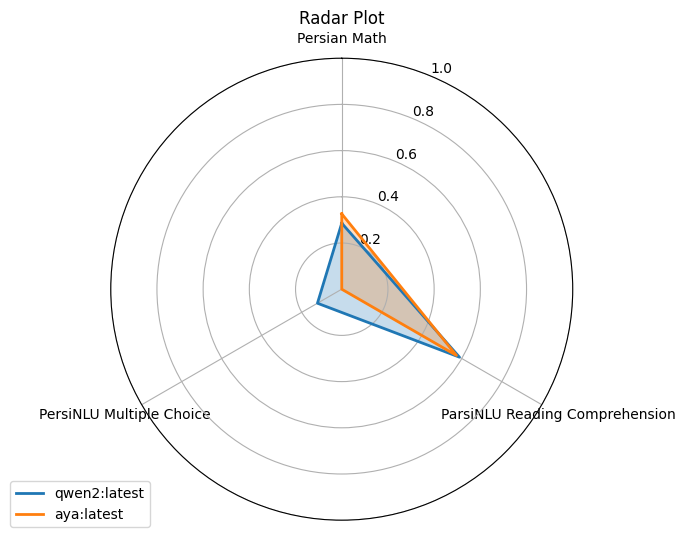
Continue with the Benchmarking tutorial.
Troubleshooting
"I can't reach the OpenAI API from Iran." Every API-based piece of ParsBench (models, the judge, the user simulator) speaks the OpenAI protocol, so point it at any OpenAI-compatible gateway: AvalAI, OpenRouter, or a local Ollama.
export OPENAI_BASE_URL=https://api.avalai.ir/v1
export OPENAI_API_KEY=...
Judge checks show as "skipped". Judge-based checks (output=,
context=, refuses=) need a judge model and skip gracefully without one.
Set PARSBENCH_JUDGE to any model name your gateway serves; see
The Judge.
import parsbench fails on math_equivalence. You only need that
package for the Persian Math benchmark task; install it as shown under
Installation.
Dataset downloads fail. Benchmark task datasets come from the HuggingFace
Hub; set HF_ENDPOINT to a mirror if the hub is unreachable from your
network.